Pay in installments of $6.10 with
 ,
,
 and
and

Shipping Estimate
USA
- USA
- CAN
- USA
- CAN
Ships within 48 hours · Estimated delivery Aug 9 - Aug 14
 Promo Codes Available:
For Your Every Summer RSVP, with Code: SUMMER15
Description
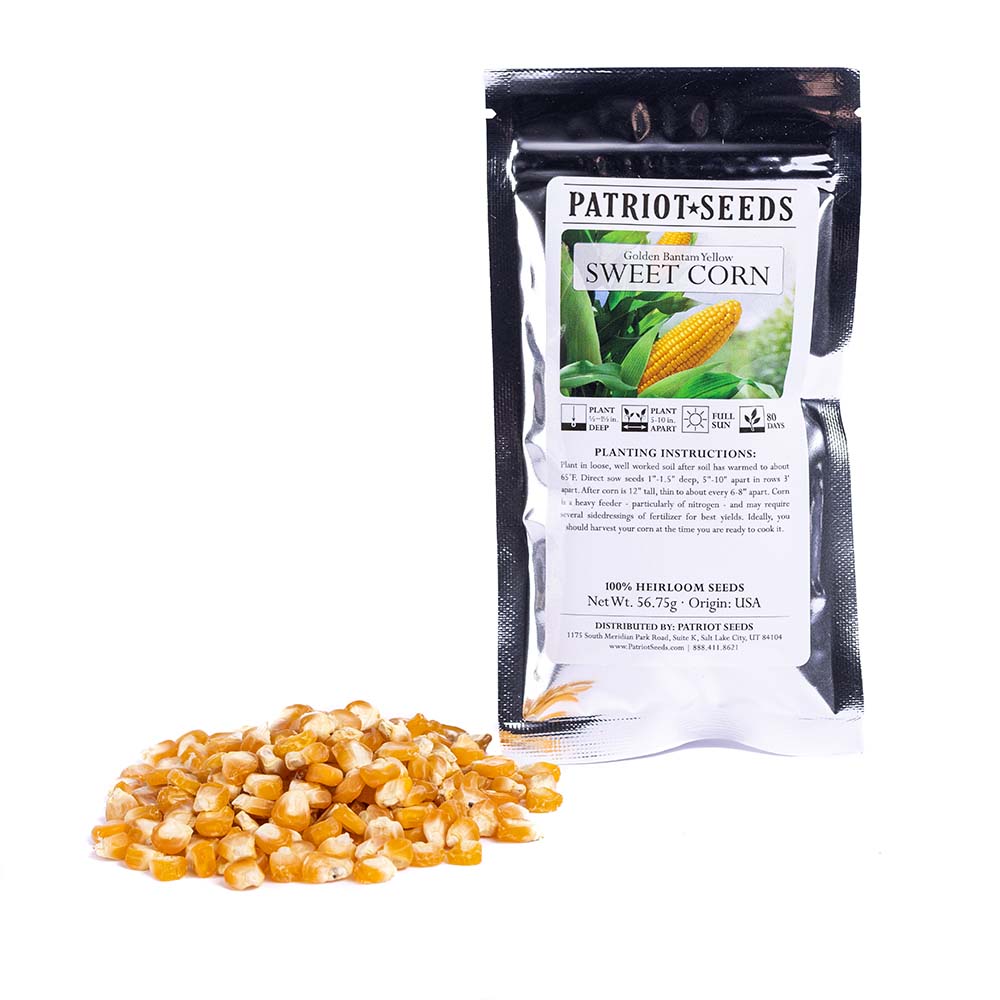
plant sweet corn seed Heirloom Golden BantamGolden Bantam Yellow Sweet Corn (56. 75g): Golden Bantam is an old time favorite. The plant yields lots of ears up to 7" long. This is the sweet corn that made us fall in love with sweet corn! Average: 80 days. Detailed planting instructions: Corn requires rich, fertile soil. Add compost or well rotted manure in fall. Consider planting a legume cover crop the season before corn to help meet the nutrient needs of this heavy feeder. Make first planting
Golden Bantam Yellow Sweet Corn (56.75g):Golden Bantam is an old time favorite. The plant yields lots of ears up to 7" long. This is the sweet corn that made us fall in love with sweet corn! Average: 80 days.
Detailed planting instructions:
Corn requires rich, fertile soil. Add compost or well rotted manure in fall. Consider planting a legume cover crop the season before corn to help meet the nutrient needs of this heavy feeder. Make first planting after last frost date. Soil should be at least 65 F for fast germination. (Corn will not germinate if soil temperature is less than 55 F.) To speed increase in soil temperature, consider covering soil with black plastic for several weeks before planting. Plant seeds 1" deep and 4 to 6" apart in rows 30 to 36" apart. Thin to 8 to 12" spacing when plants are 3 to 4" tall. Increase seeding rates to ensure a good stand if soils are cold or you are using seed that has not been treated with fungicide. (Untreated seed has natural color. Treated seed is dyed).
To save space, you can intercrop corn with early-harvested cool-season crops. Corn plants have many roots close to the surface, so cultivate around them with care. You can hill soil up around the base of plants as they grow to bury small weeds in the row and give the corn a better foothold. After the soil has warmed, you can mulch corn to help suppress weeds and retain moisture. It is not necessary to remove suckers (side sprouts growing from the base of the plant). Studies show that removing them may actually reduce yields. Corn is a heavy feeder - particularly of nitrogen - and may require several sidedressings of fertilizer for best yields. Look for signs of nutrient deficiency. Purple-tinged leaves are a sign of phosphorus deficiency. Pale green leaves are a sign of nitrogen deficiency. For miniature or baby corn, plant seeds 2 to 4 inches apart and harvest as silks emerge from the ear, or harvest secondary ears from normally spaced plantings, allowing the main ear to fully mature. Also try hybrids specifically bred for early baby corn harvest.
Harvesting:
Of all the vegetables grown, corn is the one most often harvested too late. With corn, it is essential to pick it at the right time to get the best quality and flavor. Corn also starts to lose its quality quickly after it is harvested. Within 24 hours after being picked, most corn loses more than half its natural sugars by converting them to starch. Ideally, you should harvest your corn at the time you are ready to cook it.
Check sweet corn for ripeness when the the silks have turned brown but are still damp to the touch. Pull back the husk partially and puncture a kernel. If a clear liquid spurts out, the corn is not ready. If a milky liquid spurts out, it is ready and should be picked immediately! If no liquid emerges, the corn is past its prime. Beware, however, that though pulling back the husks is a reliable method of checking for ripeness, it does have a major disadvantage if the corn is still immature when you do the checking. Once you open an immature ear, it becomes susceptible to insect and other pests, as it continues to ripen. Attack by birds also becomes more likely. With a little experience and practice, you'll be able to judge the ripeness of corn fairly accurately, just by feeling the ends of the ears and not have to worry about that problem.
Saving Seeds:
To save corn seed choose the earliest and the best-developed corncobs you can find. Cover them with a large enough paper bag to be able tie the top off to keep the bugs and grubs out. Do not use a plastic bag as the cob needs to breathe. Allow the cob to develop and dry out on the stalk as long possible. To store the cobs, remove them from the bag, pull back the husks, and hang in a dry area away from bugs or rodents, or you will end up with a dried out corncob with no seed. When the cobs are fully dried out, carefully break-off the seed, store in a paper bag, and keep in a cool place (the bottom of the fridge is a good spot) until springtime and you want to sow it.
Shipping Notes
- Free Standard Shipping on $100+ Orders to the USA.
- Except Preorder products are shipped in 48 hours.
- Delivery to the USA:
- Standard Shipping : 3-10 business days
- If time is of the essence, please consider selecting expedited delivery for faster service.
Exchange/Return Notes
- We offer a 30-day return/exchange service after receiving.
- Final sale items are not eligible for returns or exchanges.
- To process your return/exchange, please contact us at [email protected]
- Please click here for more details>>> Return & Exchange Policy
4.2 ★★★★★
Based on 19 reviews
Sort
Product Reviews
★★★★★ 5
well made, nicely built, fast and everything fits firmly
Color: Gray
Sleek and well made, heavier than my old one, as it seems better built in every way. I love the flush power buttons, they don't get accidentally pushed in because of the firmness of the buttons, not hard, just not overly easy like some cheaper hubs. The color is nice looking, the lights are subtle but easily identify each port and the main thing, it's fast. My old USB hub was decidedly slow and often under-powered. It did not always work with some demanding devices. But as soon as I plugged this in, all my devices were recognized and worked correctly.
This was a great buy.
WAS THIS REVIEW HELPFUL?YesReportShare
Reviewed in the United States on August 1, 2025
★★★★★ 4
Had some questions and needed to test it, here's the verdict!
Color: Black
No pictures, but I wished to get this review out as soon as possible because I'm very happy with my purchase. My last USB hub from aother brand broke immediately as soon as I got it which is why I wanted to purchase this as an "upgrade" for the higher voltage and more port options.
Firstly I really appreciate that they gave both a USB 3.0 to USB-C and a USB-C to USB-C cable for the power depending on what type of port you have on your computer. The extra cable is always appreciated. I had a bunch of questions stemming from other reviews so I tested them.
When you press a button nearby any port, the light goes on. When you hold it, it goes off. When the light is on, it powered my external drive, and when I hold-pressed it off, the drive on my computer disappeared as it should when no power is going to it. I'm glad that works perfectly. Also, it takes 16 seconds to recognize my 8TB drive. It seems a tiny bit long, but not too long, I'm pretty patient.
For the SD and Micro SD card slot, there is no on and off power buttons. But they DO work. This was important for me as it was one of the reasons I bought it.
The quick charging also works as intended.
Also, I wondered what size it was- it's 8.75in long, 2in width, and a measly 0.65in heightwise. Every cord included is slightly larger than 3ft so there should be no problems with connecting it, though maybe it's too many wires for some.
One thing I was concerned about was that a reviewer said the ports were very tight, and they are. I thought I was gonna break the ports by connecting a USB, but thankfully it didn't break. I don't know how realiable that is over time, though I imagine because of the buttons, the idea is to connect them once and if you want to not use it, to simply press the button to turn them off. So I think I'll do that once I get all my USBs set into place. If it breaks any port in that process down the line, I'll update my review.
And based on the manual, here are the speeds:
USB 3.0 & USB C - Max 5GB/sec data speed, Max 5V/1.5A power
SD and Micro SD Slots - Read 50-104MB/sec, Write 30-80MB/sec (Subject to memory card speed and computer USB ports)
USB QC Ports - No speed or power given
Total power supply: Output DC 12V/7.5A (Input AC 100V~240V / 50Hz~60Hz / 2A)
The power supply is a big brick LOL. But I appreciate the power, thanks. It's very easy to use overall, I just plug something in, turn the light on, expect it to work and it does. Besides it taking great force to plug a USB in, everything else is exactly what I wanted. Glad I bought this.
Edit, a month or two later: The USB ports all still are working, but I noticed some external drives don't have enough power to work, even with the 8V, so I'm docking a point. I should be able to plug at least one in with a few other things connected, but this makes it a little less functional for my usage.
WAS THIS REVIEW HELPFUL?YesReportShare
Reviewed in the United States on June 13, 2025
★★★★★ 5
Just what I needed
Color: Black
Never given!give 5 stars. But, this got it because exceeded what I was expecting.
Purchased because new computer slots were inconvenient and more new devices are using usb ports and having powered ports was essential. Have used for several months and keep finding more things needing it. It was more than I expected/needed at the time .But, was designed for growth I was not expecting. Getting excellent connections, speed, and reliability even though I’ve nearly doubled the devices I planned on using. To be clear the system I connected to is all about performance and top of the line hardware. I was a performance engineer in a previous position and am very picky with this system setup. I’ve tested the hardware several times tuning things and it’s never the bottleneck.
The original purchase was intended as a short term fix when I needed something yesterday and as stated b4 it has earned a place in my permanent setup.
Would buy again and would explore other offerings by manufacture.
WAS THIS REVIEW HELPFUL?YesReportShare
Reviewed in the United States on October 23, 2025
★★★★★ 5
USB Hub Extraordinaire
Color: Black
This USB Hub has been better than I expected. Purchased for work, it has streamlined my peripherals, keeping limited desk space from becoming problematic. Absolute must in fast paced work environment. Highly recommended.
WAS THIS REVIEW HELPFUL?YesReportShare
Reviewed in the United States on May 29, 2026
★★★★★ 5
Very useful USB hub
Color: Black
Works as described. This thing has more inputs than most will ever need. I thought it would be big and bulky but it doesn't take up much space at all. It's super lightweight, except for the power supply but even then, it's not that heavy. I'm currently using some of the USB 3.2 ports and 1 of the USB charging ports with zero issues and now I'm able to plug more devices without fear of my PC struggling to communicate with them all. It's a little pricey compared to other USB hubs but I feel it's totally worth it.
WAS THIS REVIEW HELPFUL?YesReportShare
Reviewed in the United States on December 3, 2025